
Questions that adapt
Show relevant follow-up questions based on each answer, without making customers work through fields they do not need.
Custom forms & tool connections
Start with what you want to achieve. WaveHello shapes your form’s design, features, and connections around your business.
Built for a new website or the one you already have.
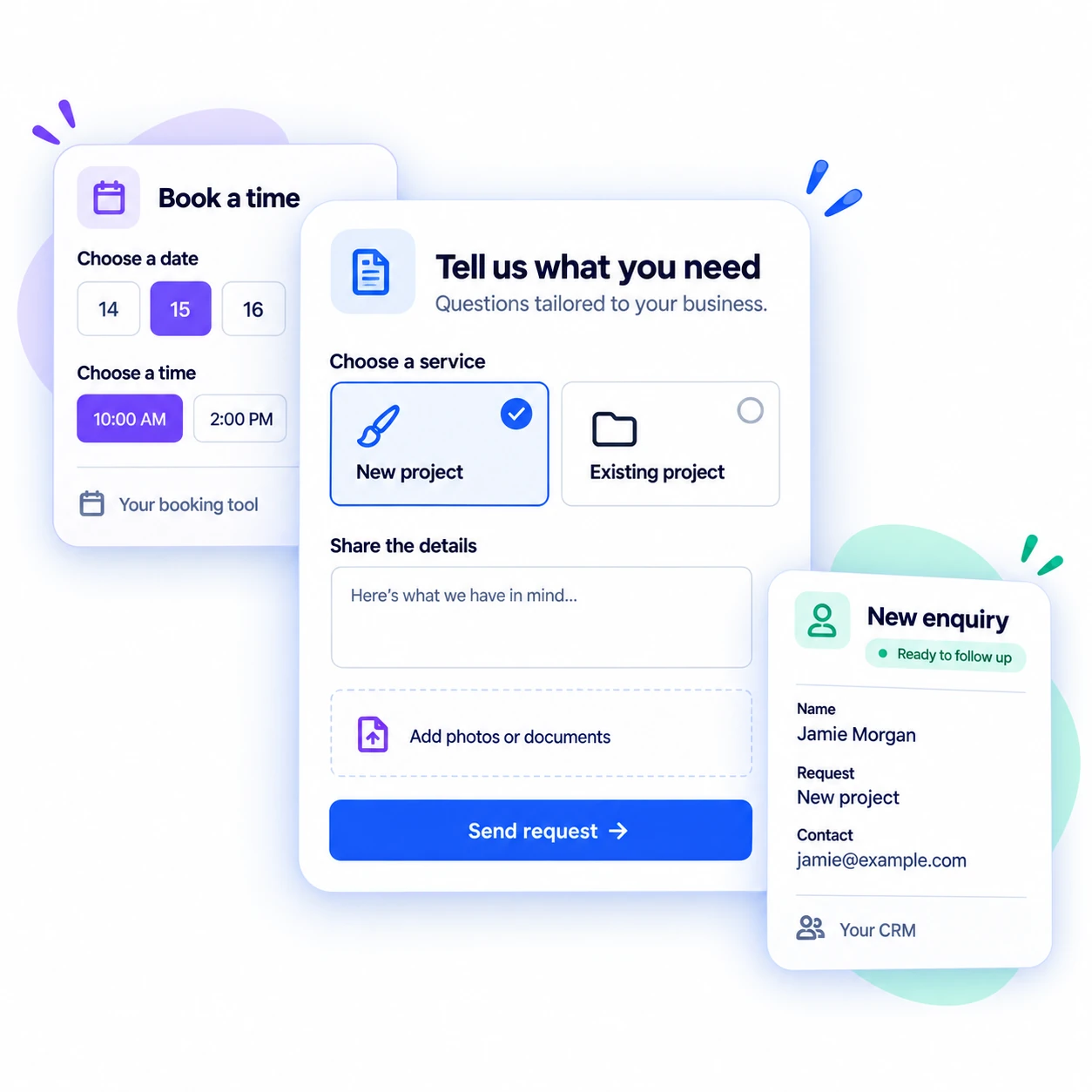
Choose what your form can do
Give customers an easier way to share what you need. Choose the features that help your team review requests, arrange appointments, and follow up with a clearer picture.
Show relevant follow-up questions based on each answer, without making customers work through fields they do not need.
Break detailed requests into short steps, so customers can focus on one part at a time.
Collect photos, documents, and project details upfront, with less back-and-forth to get the full picture.
Send each inquiry to the team that handles that service or area, without sorting every request by hand.
Offer a way to choose an available time through your booking tool, with less scheduling back-and-forth.
Keep available ad, page, or referral details with each inquiry to see where interest comes from.
A more personal form experience
One form can serve different needs. Each answer shapes what comes next, so customers see relevant questions and your team gets useful details.
CRM, booking & email connections
Send new inquiries to your CRM, let customers book appointments, and keep your team updated—with less manual work along the way.
Send new inquiries and their details straight to your team's inbox, ready for follow-up.
Send contact details and requests to compatible customer-management software (CRM). The connection depends on your account plan, access, and the records your team needs.
Let customers choose an available appointment through a compatible booking tool. A booking link and a confirmed reservation are different steps.
A direct connection is planned. It is not available yet, and you do not need it to use a custom form.
Connections are available for compatible tools. Choose only the connections you need.
Choose the right level
Every WaveHello website build or redesign includes a basic form sent to one email inbox. Custom forms and tool connections are separate, optional work—choose them when you need more than a basic form.
| What you need | Included website form | Custom lead form |
|---|---|---|
| Questions | Contact details and a short request | Tailored questions, guided steps, and answers that shape what comes next |
| Files and detail | Not part of the basic form | Photos, documents, and supporting project details |
| Email and tool connections | One email inbox | Email, CRM delivery, or appointment booking through compatible tools |
| Who receives it | One recipient | Different teams based on answers, service, or location |
| Where the inquiry came from | Page information, when included | Available ad, page, or referral details when lead-source tracking is included |
How the build works
You bring the goal. We turn it into a form built for your website, your customers, and your team.
Share what customers need to send or book, and the tools your team uses today.
Get a plan for the questions, features, and connections that suit your business, with clear scope and cost.
We create the form for your website and connect your chosen tools. You can try the full experience before launch.
Approve the finished form, then put it to work. We hand over access and explain how to request future changes.
Your form. Clear responsibilities.
Know how your form handles customer details and who looks after it, so your team can use it with a clear understanding of access and support.
Keep requests focused on useful information, without asking customers to share more than your team needs.
Know where customer details are stored, who can view them, and who manages your form and connected accounts.
Know who to contact and what to do if an inquiry does not reach its destination.
Frequently asked questions
WaveHello builds custom forms around what your business needs customers to do. That includes the questions, wording, design, steps, and what happens next—not just the fields in a fixed template.
Depending on your needs, a custom form can show different questions, accept files, offer appointment booking, or connect with compatible CRM tools. Connections depend on the tools, account access, and workflow agreed for your project. These are options, not a required bundle.
Read this answer in the FAQ hubStart with the form tool that can collect the necessary information and deliver it to the place your team actually monitors. HubSpot forms, Pipedrive Web Forms, and Zoho CRM webforms are options when their CRM and plan fit your workflow. A custom form may be appropriate when the agreed questions, routing, or compatible connections need a tailored build.
Compare mobile completion, required fields, spam handling, record creation, owner notifications, and recovery when delivery fails. A thank-you screen alone does not prove the inquiry reached the team. Confirm the destination record and a person responsible for responding before treating capture as complete.
Read this answer in the FAQ hubYes. A custom form can use someone's earlier answers to decide what to ask next. People see the questions relevant to their request instead of working through every possible field.
For example, a new project request might ask about goals and timing, while a request about existing work asks for a reference number and a description. Those are examples, not fixed templates: the choices, wording, steps, and next actions can be shaped around your business.
WaveHello can build a new website or add a custom lead form to an existing site, with a connection to compatible CRM and booking tools. The basic form included in a website build sends inquiries to email; CRM delivery and booking are separately scoped custom-form options.
To confirm a connection, WaveHello needs to know your CRM or booking product, account plan, available access, and what each request should create or update. Compatibility depends on those details. A listed tool or a booking link does not establish that the complete workflow is supported or that an appointment has been confirmed.
Read this answer in the FAQ hubYes. File uploads can be part of a custom form and can appear only for the types of request that need them. A customer with a simple question does not need to see the same upload step as someone sharing project details.
Choose the file types, size limits, destination, and access arrangements for the job. Collect only information the team needs, and use a suitable secure process for sensitive documents rather than assuming every website form is appropriate.
Read this answer in the FAQ hubLet’s build what fits
Tell us what you want customers to share, send, or book—and which tools you use. We will help you choose the right features and connections.